Basic Magic Chain Brushes: A Procreate Designer's Guide
When you're working on a digital illustration that requires intricate details like jewelry, belts, or decorative trims, standard brushes often fall short. They can look flat, repetitive, or lack the weight and texture of real metal. This is where specialized design assets become invaluable. The Basic Magic Chain Brushes set for Procreate is a dedicated toolkit designed to solve this specific problem, offering a fast and realistic way to draw chain elements directly on your iPad. It’s less about typography and more about adding a tangible, premium texture to your digital work.
Visual Characteristics and Overall Appeal
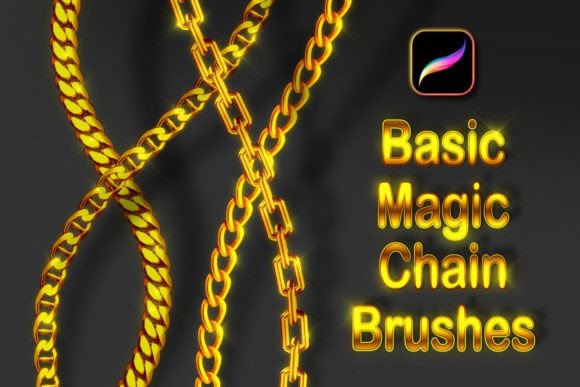
The core strength of this brush set lies in its realism and versatility. The 28 various basic chain brushes provide a solid foundation, covering everything from delicate, fine links to heavy, industrial-looking chains. The visual personality is defined by its opaque, textured appearance. Each link is rendered with subtle shading and highlights, giving it a three-dimensional quality that flat vector shapes can't easily replicate. The brushes are designed for smooth, even strokes, which is crucial when drawing curved lines for necklaces or bracelets. This prevents the common issue of a chain looking jagged or distorted along a curve.
What truly sets the Basic Magic Chain Brushes apart is the ability to change colors using Procreate's Gradient Map. This feature allows you to move beyond simple gold or silver. You can apply complex color gradients to simulate rose gold, oxidized bronze, or even fantastical, iridescent metals. The two included sparkling glitter brushes add another layer of polish, perfect for adding highlights or creating a gem-encrusted effect. The overall appeal is one of efficiency and quality—it turns a time-consuming manual task into a fluid, creative process.
Where These Brushes Shine: Practical Applications
Understanding where a tool like this fits into a workflow is key to getting the most value from it. The applications for Basic Magic Chain Brushes extend across several creative fields.
For Illustrators and Character Designers: This is the most direct use case. Adding detailed necklaces, bracelets, earrings, or even chainmail armor to character portraits becomes straightforward. The brushes help establish a character's style, whether it's punk, fantasy, or high-fashion, and contribute significantly to the overall brand identity of the illustration series.
In Graphic Design and Branding: Think beyond literal chains. A stylized chain link can be a powerful motif in logo design or packaging design for luxury goods, jewelry brands, or edgy streetwear. Using these brushes to create a custom border, divider, or background texture adds a unique, hand-crafted element that stock graphics lack. It injects personality into social media graphics, making posts for a jewelry designer or fashion blogger instantly more professional and visually engaging.
For Digital Product Creators and Crafters: If you design assets for others—like printable wall art, planner stickers, or sublimation designs—these brushes are a fantastic addition to your toolkit. They allow you to create intricate, saleable designs that stand out in a crowded market. A hobbyist creating a digital scrapbook page or a custom invitation can use them to add a touch of elegance and detail.
Integrating the Tool: Setup and Best Practices
Getting started is simple, but a few technical notes ensure the best results. The Basic Magic Chain Brushes are compatible exclusively with the Procreate application on an Apple iPad. They will not function in Adobe Photoshop or other software.
- Installation: After downloading the .zip file, navigate to it on your iPad. Previewing the content will reveal the brush file; a single tap will import it directly into your Procreate brush library.
- Initial Setup: Before drawing, these brushes need to be configured for color. In the brush settings, ensure the Color Dynamics are set to use both Primary Color and Secondary Color. This is what enables the beautiful gradient map effects.
- A Key Tip for Quality: Always enable Dynamic Brush Scaling in Procreate's preferences. This setting helps maintain the brush's texture quality and detail at different sizes, preventing it from looking blurry or pixelated when you scale your brush up or down.
Evaluating Fit and Maximizing Impact
Like any design asset, the value of Basic Magic Chain Brushes depends on how well they serve your project's goals. Before diving in, consider the following.
Project Suitability: Is the visual language of your project compatible with detailed, textured elements? These brushes excel in styles that appreciate hand-crafted detail, from realistic illustration to stylized branding. For minimalist, ultra-clean designs, they might feel overly busy.
Font Pairing and Hierarchy: If you're using chain motifs alongside text, think about font pairing. A heavy, textured chain graphic pairs well with a clean, modern sans serif font for contrast. A delicate chain might complement an elegant serif or script font. The chain element can serve as a strong visual anchor or divider, helping to establish a clear visual hierarchy on a page or screen.
Readability and Balance: The primary consideration when using decorative brushes is ensuring they don't overpower the message. Use chains as accents—a border on a poster, a detail on a business card, a frame for a social media image—not as the background for body text. The goal is to enhance, not distract.
Licensing and Commercial Use: Always review the specific license included with the download. For designers and small business owners, confirming that the assets are cleared for commercial use in client projects or for sale in your own digital products is a critical step. This ensures you can use the Basic Magic Chain Brushes confidently and professionally.
In the end, the Basic Magic Chain Brushes set is a focused, practical tool. It doesn't try to be everything; it aims to solve a specific design challenge with quality and ease. For creators who regularly need to depict metallic chains, it's a valuable asset that can save hours of manual drawing time while elevating the final polish of their work.