Bring Irish Charm to Your Digital Canvas with the St. Patrick’s Day Gnome Procreate Brush
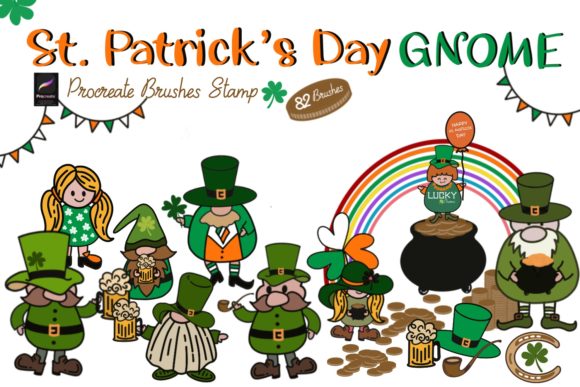
When March rolls around, designers and creators face a specific challenge: how to capture the whimsy and festive energy of St. Patrick's Day without resorting to overused, low-quality clipart. Enter the St. Patrick’s Day Gnome Procreate Brush. This isn't just a single tool; it is a comprehensive brush set containing 82 individual stamps designed specifically for the iPad app, Procreate. For graphic designers, stationery creators, and content producers, this asset bridges the gap between professional quality and seasonal fun.
Unlike standard vector graphics that can feel rigid, these stamps offer a tactile, hand-drawn aesthetic that feels personal and inviting. The visual style leans heavily into the "kawaii" or folk-art trend, featuring the iconic pointed hats, beards, and boots associated with garden gnomes, but reimagined for the holiday with four-leaf clovers, pots of gold, and Irish green motifs. It is a premium digital asset that allows you to inject personality into your work instantly.
Visual Style and Creative Application
The true value of the St. Patrick’s Day Gnome Procreate Brush lies in its versatility as a design asset. Because these are stamp brushes, they function as high-quality digital rubber stamps. You tap the screen, and the gnome appears. However, calling them mere stamps does them a disservice. The line work is clean, making them suitable for both digital screens and high-resolution printables. The visual style is charming and slightly rustic, fitting perfectly into modern "craft" aesthetics that dominate platforms like Etsy and Pinterest.
Where does this set truly shine? Consider the breadth of projects it supports:
- Digital and Printable Stationery: Create cohesive greeting cards, invitations, and planner stickers that feel custom-designed.
- Social Media Graphics: Stand out on Instagram or Facebook with unique doodles for your Stories or feed posts. A single gnome stamp can serve as a fun visual break in a carousel post.
- Surface Pattern and Packaging: If you are a small business owner, use these brushes to create seamless patterns for wrapping paper or festive packaging designs for your products.
- Wall Art and Decor: Design printable wall art quotes where the gnomes act as decorative borders or focal points.
From a brand identity perspective, using these stamps allows you to show a playful side without compromising professionalism. It signals to your audience that your brand is current, attentive to seasons, and capable of high-quality visual communication.
Integrating the Gnomes into Your Design Workflow
One of the biggest hurdles with new design assets is the learning curve. Fortunately, the St. Patrick’s Day Gnome Procreate Brush is engineered for ease of use. Once you have the set installed, you simply select the brush, choose your color, and tap. This immediacy is crucial for entrepreneurs and content creators who need to produce marketing materials quickly.
However, to truly master this asset, you need to treat it like a professional tool rather than just a novelty. Here is how to get the most out of your 82 stamps:
- Scale and Composition: Don't just drop a gnome in the center of the canvas. Use the "Transform" tool in Procreate to resize them. Place a large gnome as a background element behind text, or use a row of tiny gnomes as a border for a blog post header.
- Color Harmony: While the stamps are often used in green, red, and white, do not be afraid to match them to your specific brand palette. A pastel pink gnome might be perfect for a boutique's spring sale.
- Layering and Texture: Experiment with the blending modes. Setting a gnome stamp to "Multiply" allows it to sit realistically on top of textured paper backgrounds, creating a cohesive look for digital planners.
Technical Details and Installation
Nothing disrupts a creative flow faster than technical difficulties. The creator of the St. Patrick’s Day Gnome Procreate Brush has streamlined the process, but it is essential to follow the correct steps to ensure the assets load correctly into your software.
First, ensure you are working on an iPad with Procreate installed, as these files are optimized for that specific ecosystem. Once purchased, you will download a .brushset file. In most modern versions of iPadOS, simply clicking the downloaded file will automatically prompt Procreate to import the entire collection into your brushes library.
If the automatic import fails—which can happen due to file size or system glitches—manual import is simple:
- Open your "Files" app and locate the downloaded .brushset file.
- Long-press the file icon.
- Select "Share" from the context menu.
- Scroll through the apps list and select "Copy to Procreate" (or "Open in Procreate").
Once imported, the 82 stamps will appear in a new set at the top of your brush menu. They are ready to use immediately for any commercial or personal project, including business cards, posters, and illustrations.
Elevating Your Marketing with Seasonal Visuals
In the crowded digital landscape, seasonal marketing is a proven strategy for engagement. However, using generic stock images can dilute your brand's unique voice. By utilizing the St. Patrick’s Day Gnome Procreate Brush, you create proprietary visuals that belong only to your brand. This builds recognition and trust with your audience.
Whether you are a blogger decorating a post about "Top 10 Irish Recipes," a marketer creating a flash sale banner, or a hobbyist making wall art for friends, this brush set provides the professional polish required to make your work stand out. It turns a simple tap of the Apple Pencil into a moment of creative magic, allowing you to produce designs that are not only festive but also fundamentally sound from a design perspective. This set is a practical addition to any digital creator's toolkit, ensuring you are ready to celebrate the luck of the Irish with style and efficiency.