Embrace Spring: Procreate Brush Stamp Cherry Blossom for Digital Artists
There is a distinct feeling that comes with the first signs of spring—that soft, fleeting beauty of sakura petals drifting in the breeze. For digital artists, capturing that specific aesthetic often requires a delicate touch and a lot of patience. That is exactly why the Procreate Brush Stamp Cherry Blossom set has become such a valuable asset in my creative toolkit. It isn't just a collection of digital flowers; it is a shortcut to creating atmosphere. When you are working on a tight deadline for a client or simply doodling in your journal, having a reliable premium font or, in this case, a high-quality stamp set, changes the workflow entirely.
The Anatomy of a Perfect Stamp Set
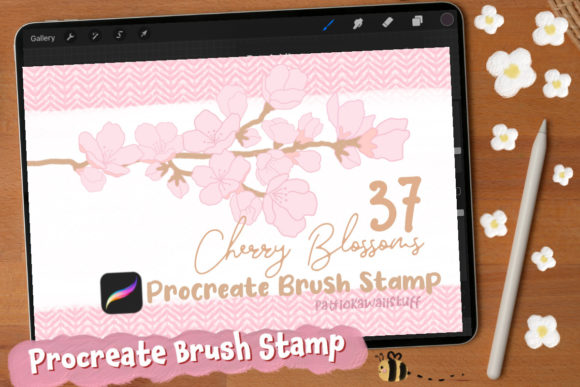
When we talk about design assets, consistency is key. This particular set offers a robust library of 21 bloom stamps and 16 bud stamps. The visual style strikes a balance between realism and illustration. These aren't stiff, robotic graphics; they possess a soft, organic personality that mimics natural growth. The variety is what makes it practical. You aren't just stamping the same flower over and over. You have full blooms for focal points and delicate buds for filling negative space, which allows you to create depth and visual hierarchy without needing advanced drawing skills.
The appeal lies in the versatility of the Procreate Brush Stamp Cherry Blossom. Whether you are working on a moody, dark background to make the pink pop, or a light, airy canvas for a wedding invitation, the stamps adapt beautifully. Because you can adjust the color and opacity within Procreate, you can transform a bright cherry blossom into a subtle, grey shadow or a vibrant neon graphic for social media. This adaptability is crucial for anyone managing a brand identity where color palettes need to be strictly adhered to.
Practical Applications for Designers and Entrepreneurs
If you are a small business owner or a content creator, you know that visual assets drive engagement. The Procreate Brush Stamp Cherry Blossom set fits seamlessly into a wide range of projects. Here is how creative professionals are using these assets to elevate their work:
- Social Media Graphics: In the fast-paced world of Instagram and TikTok, standing out is hard. Adding a cluster of sakura flowers to a text overlay or a quote post instantly adds a layer of polish and seasonal relevance.
- Packaging Design: For entrepreneurs in the beauty, wellness, or food industries, these stamps can be used to mock up packaging. Imagine a tea box or a soap wrapper adorned with these delicate buds. It communicates a message of natural ingredients and care.
- Editorial and Web Design: If you are designing a blog header or a website hero image, these stamps can serve as decorative borders or background textures that don't overpower the main content.
- Personal Projects: Hobbyists and crafters can use them to design custom greeting cards, scrapbook pages, or digital planners. It brings a handmade feel to digital organization.
Think of these stamps not just as drawings, but as design assets that solve problems. Instead of spending an hour trying to draw a perfect petal, you stamp it once and move on to the layout, typography, and overall composition. It is about working smarter, not harder.
Integrating Florals into Modern Typography
In modern typography, the interplay between text and imagery is vital. A common mistake in graphic design is treating text and graphics as separate entities. However, the best editorial design and logo design work often involves weaving illustration into the letterforms. The Procreate Brush Stamp Cherry Blossom allows you to do exactly that.
For instance, if you are using a script font or a handwritten font for a logo, you can use the bud stamps to dot the "i" or cross the "t," or weave the blooms around the ascenders and descenders. This technique softens the typography and creates a cohesive image. It is particularly effective for brand identity work for florists, wedding planners, or lifestyle brands.
When testing font pairing, consider the weight of the flowers. The sakura blooms have a certain visual weight to them. If you pair them with a very thin, light sans serif font, the flowers might dominate. Conversely, pairing them with a bold, chunky serif font can create a beautiful contrast between the rigid structure of the type and the organic flow of the blossoms. Always test your font pairings with the stamps active to ensure the hierarchy remains clear. The text should still be readable, and the flowers should enhance, not distract.
Technical Workflow and Best Practices
While the prompt mentions a "font," it is important to clarify that this is a brush set, which functions differently than a typeface. You do not type with these; you paint with them. This distinction is vital for your workflow. Here is a practical guide to getting the most out of your Procreate Brush Stamp Cherry Blossom:
- Layer Management: Always create a new layer for your stamps. This allows you to erase parts of a stem that might overlap awkwardly or adjust the opacity of the background flowers without affecting your main subject.
- Color Dynamics: Don't settle for flat colors. Use the "Color Dynamics" settings in Procreate to vary the hue and saturation slightly with each stamp. This mimics the natural variation of real flowers and adds realism to your web design or illustration.
- Transform and Warp: Use the Transform tool to scale and rotate. To make a branch look like it is curving around an object, use the Warp mesh tool. This is essential for packaging design where the canvas isn't flat.
- Clipping Masks: If you want to add texture to the flowers or change their color to match a specific brand palette exactly, use a clipping mask. This keeps your edits non-destructive.
Remember, these assets are tools to support your creative font choices and layout decisions. They are not a replacement for good design principles, but rather an enhancement to them.
Evaluating Project Fit and Licensing
Before incorporating any asset into a commercial project, you must evaluate the fit and the rights. The Procreate Brush Stamp Cherry Blossom set is a commercial font (asset) in the sense that it is designed for professional use. However, always double-check the specific license provided by the creator. Most standard licenses allow for use in end-products like t-shirts, mugs, and digital prints, but they usually prohibit reselling the brush files themselves.
When evaluating if this style fits your project, ask yourself: Does this align with the brand's voice? A tech startup might not find a use for cherry blossoms, but a skincare line or a boutique hotel certainly would. It is about context. The "personality" of the sakura is gentle, romantic, and ephemeral. If your brand identity is aggressive, loud, or hyper-modern, these might clash.
Finally, check the technical requirements. As noted, these are created for the Procreate app on the iPad. They will not work in Photoshop or Illustrator. Ensure your workflow supports this. If you are a designer who works across platforms, you might need to create your assets in Procreate and then export them as PNGs to use in your web design software later.
By thoughtfully integrating the Procreate Brush Stamp Cherry Blossom into your process, you bridge the gap between digital efficiency and organic beauty. It allows you to produce high-quality social media graphics, merchandise, and art that resonates with an audience looking for a touch of nature in their digital lives.