Lace Braid. Pattern Brushes: Your Shortcut to Elegant Design
There’s a certain magic in a design that feels both intricate and effortless. That delicate, woven texture of a lace braid can instantly add a layer of sophistication and handcrafted charm to almost any project. But manually creating those complex, repeating patterns vector by vector? That’s a time-consuming task most designers and creators would rather avoid. This is where a smart set of tools becomes invaluable. The Lace Braid. Pattern Brushes for Adobe Illustrator is one such tool, designed to transform a simple path into a beautifully ornate braid with a single click.
Understanding the Power of a Pattern Brush
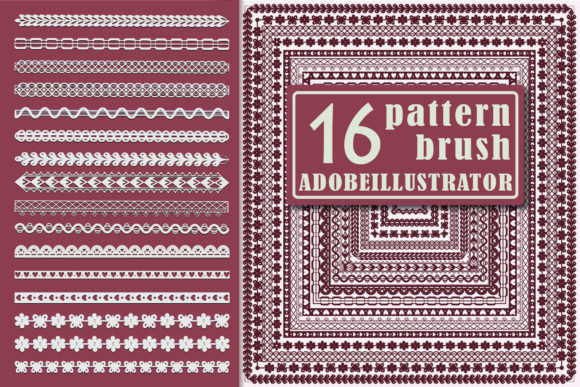
Unlike a static graphic, a pattern brush is a dynamic, live element in your workflow. Think of it as a smart, repeatable tile that follows any path you draw. With the Lace Braid. Pattern Brushes set, you get 16 variations of this elegant weave. The true practicality lies in its flexibility. Once applied to a path—whether it’s a straight line, a graceful curve, or a complex shape—you can continue to edit. Need a thicker braid for a poster border? Adjust the stroke weight. Want a more subtle accent on a business card? Scale it down. The vector nature means it stays crisp and clean at any size, a critical requirement for professional logo design and packaging design.
This set is delivered in formats compatible with modern and older versions of Adobe Illustrator (CC and AI10), as well as an EPS file for use in other vector software. This makes it a versatile addition to your library of design assets, ready to integrate into your existing creative process without compatibility headaches.
Where Woven Textures Elevate Your Work
The applications for a lace braid pattern are surprisingly broad, spanning both digital and physical realms. Its personality is one of refined elegance with a touch of artisanal warmth, making it suitable for projects that aim to feel special and considered.
- Branding & Identity: Use it as a subtle border on a letterhead, a decorative frame around a logo, or an accent on a thank-you card to build a brand identity that feels cohesive and premium. It’s a creative font asset that adds character without overwhelming the core message.
- Editorial & Publishing: In editorial design, these brushes can create stunning chapter dividers, ornate initial capitals, or elegant frames for pull quotes in magazines, books, or annual reports. It brings a touch of modern typography flair to traditional layouts.
- Digital & Social Media: For web design, use it to create custom dividers or decorative elements in hero sections. For social media graphics, it’s perfect for crafting unique story borders, Instagram post frames, or Pinterest pin accents that stop the scroll.
- Print & Merchandise: The pattern is ideal for physical products. Think packaging design for luxury goods, elegant invitations and stationery, decorative elements on posters and prints, or even custom patterns for T-shirts and pillows.
The key is to match the brush’s personality to your project’s tone. It naturally complements projects in fashion, beauty, weddings, artisanal food, home decor, and boutique branding—anywhere a sense of craftsmanship and detail is valued.
Practical Guidance for Implementation
Getting the most out of a tool like this involves a few practical considerations. First, always check your software version against the requirements. This ensures the brushes load and function correctly, saving you from workflow interruptions.
When evaluating fit, consider your project’s overall aesthetic. A lace braid pattern adds visual texture and complexity. If your design is already very busy with other serif fonts, sans serif fonts, and imagery, you’ll want to use the braid sparingly as an accent. In cleaner layouts, it can take on a more prominent role.
Font pairing is another crucial thought, even though this is a pattern brush and not a typeface. The style of the braid should harmonize with your chosen fonts. A delicate, flowing braid pairs well with a elegant script font or a refined serif font. A more geometric or structured braid might complement a clean sans serif font. Test a few combinations to see what feels balanced.
Finally, remember that this is a vector tool. This means you have full control over color. Don’t feel locked into a traditional white or black braid. Experiment with your brand’s color palette, use gradients for depth, or apply a textured fill for an even more unique look. This adaptability is what makes it a valuable premium font asset for a wide range of creators, from small business owners and marketers to hobbyists and professional designers.
Building Consistency and Professional Recognition
Using a distinctive design element like the Lace Braid. Pattern Brushes consistently across your touchpoints does more than just decorate. It builds a thread of visual recognition. When your audience sees that same elegant weave on your social media, your website, and your product packaging, it reinforces your brand identity and makes your work instantly more recognizable.
This consistency signals professionalism and attention to detail. It shows that you’ve considered every element, which builds trust and enhances audience engagement. In a crowded market, these subtle, refined details are what help a brand stand out and be remembered. It’s not about using the loudest tools, but the most thoughtful ones.
By integrating assets like this set into your toolkit, you’re not just adding a pretty pattern. You’re equipping yourself with a versatile, professional-grade element that can solve real design challenges, save significant time, and ultimately help you create more polished, impactful, and cohesive work. It’s a practical step toward elevating the visual language of whatever you create next.