Polished Metal Pipe Illustrator Brushes: Add Hi-Tech Shine
The Instant Industrial Edge for Modern Design
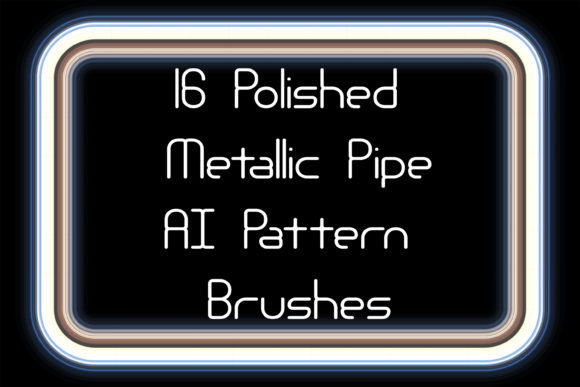
When a design calls for something more substantial than a simple line or a flat color, texture and dimension become paramount. This is where specialized tools like Polished Metal Pipe Illustrator Brushes enter the scene. This collection isn't about typographic flair in the traditional sense of serif or sans serif fonts; it's a set of 16 pattern brushes designed to create seamless, editable ribbons of burnished metal directly within Adobe Illustrator. Think of them as a premium design asset for adding instant industrial polish and a Hi-Tech personality to your work.
These brushes simulate the look of real-world metallic surfaces—gold, silver, steel, copper, brass, chromium, aluminum, iron, and various alloys. The visual appeal lies in their reflective, dimensional quality. They can be used to create everything from elegant friezes and decorative edging to bold, eye-catching borders and intricate line work. Unlike a static image, these are live vector brushes, meaning you can draw a path of any length or shape, and the polished metal pattern will stretch and follow it perfectly. You maintain full control to change the color, stroke weight, and scale, making it a supremely flexible creative font alternative for graphic elements.
Where Metallic Brushes Make the Strongest Impact
The true value of a tool like this is in its application. For logo design, a subtle silver or steel pipe brush can underline a brand name, giving a tech startup or engineering firm an immediate sense of precision and strength. In packaging design, a gold or copper border crafted with these brushes can elevate a luxury product, suggesting quality and value before the customer even touches the box. This is where understanding brand identity is crucial; the chosen metal communicates a specific message.
For editorial design and publishing, these brushes are perfect for creating unique chapter headings, pull quotes, or section dividers in magazines, lookbooks, or annual reports. They add a layer of sophistication that standard typographic elements cannot. In the realm of web design and social media graphics, they can be used to create standout banners, stylish buttons, or animated UI elements that catch the eye in a crowded feed. The Hi-Tech style is particularly effective for content related to finance, automotive, gaming, or luxury goods. Even crafters and hobbyists can use them to design stunning digital invitations, posters, or branding materials for small business projects.
Practical Guidance for Integrating Metallic Elements
Adopting a new design asset requires a practical approach. First, evaluate your project fit. Ask if the metallic, industrial aesthetic aligns with your brand's voice or the project's tone. A warm, organic brand might find chromium too cold, while a tech brand would thrive on it. Next, consider visual hierarchy and readability. These brushes are best used as accent elements—a headline underline, a border, a decorative flourish. Using them for body text would be disastrous for readability. They are display elements, not workhorses like a good sans serif font.
A key strength of the Polished Metal Pipe Illustrator Brushes is the inclusion of corner elements. This is a critical detail for creating professional-looking frames and boxes. Without them, mitered corners can look awkward. With them, you achieve a clean, finished look. Always test your pairings. A bold, polished brass pipe pairs well with clean, modern typography like a geometric sans serif. A finer steel or aluminum brush might complement an elegant serif font. The contrast between the highly decorative brush and the functional text is what creates visual interest and a clear hierarchy.
From a technical standpoint, the package is well-considered. Compatibility with Illustrator CS5 and above covers most active users. The inclusion of Ai and EPS 10 files means you can open and even modify the original brushes in older software versions if needed, ensuring longevity. The PDF help file is a welcome touch for those less familiar with loading and using custom brushes, lowering the barrier to entry. For commercial projects, always review the licensing details provided with your purchase to ensure compliance, especially for client work or products for sale.
In conclusion, these Illustrator brushes are less a traditional typeface and more a specialized component within a larger typographic and design system. They provide a shortcut to a specific, high-impact visual style. When used thoughtfully—as a strategic accent rather than a dominant feature—they can significantly enhance the professionalism, perceived value, and visual engagement of a wide array of creative projects. They solve the specific problem of needing to add polished, dimensional metallic accents quickly and editably, making them a valuable addition to any designer's toolkit of design assets.