24 Simple Vector Sewing Brushes for Fashion Design
When you’re sketching out a new garment or finalizing a technical flat, the small details make the difference between a rough concept and a polished presentation. I’ve seen too many designers waste hours trying to manually draw dashed lines or inconsistent stitch marks, only to end up with a messy, unprofessional look. This is where the 24 Simple Vector Sewing Brushes come into play. It’s a focused, practical toolkit designed specifically for Adobe Illustrator that eliminates the guesswork of rendering stitching effects.
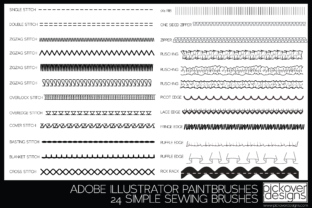
At its core, this collection is a set of 24 distinct stitch patterns saved as Illustrator brushes. It covers the essentials: from the basic Running Stitch to the Blanket Stitch, Top Stitch, and even decorative variations. The "Simple" in the title is key here. These aren’t over-designed, complex textures that slow down your computer. They are clean vector paths that maintain their integrity at any scale. Whether you are a seasoned fashion designer or just beginning your journey into digital illustration, having a reliable library of 24 Simple Vector Sewing Brushes is like having a well-organized physical toolbox.
Visual Characteristics and Practical Appeal
The personality of this set is utilitarian and precise. In the world of design assets, you often find tools that prioritize flair over function. These brushes do the opposite. They prioritize accuracy. The visual style is clean and standardized, which is exactly what you need for technical packs (tech packs) or detailed fashion sketches. If you are working on a brand identity for a clothing line, you need consistency. You don't want one sleeve showing a thick stitch and the other showing a thin one unless intentional.
One of the standout features of this Illustrator file (.ai) is how it handles color. A common frustration with vector brushes is that they act like images rather than lines—meaning you have to go into the brush settings to change the hue. The 24 Simple Vector Sewing Brushes are configured to respond to your swatch selection immediately. Pick a red thread, apply the brush; pick a blue thread, apply the brush. It’s seamless. This responsiveness makes it a premium font alternative for texture; it functions with the same ease as typing text, but for technical details.
Where These Brushes Fit Best
You might think a sewing brush set is only for drawing clothes, but the applications are broader than you’d expect. Of course, the primary use case is fashion illustration. If you are a pattern maker or a fashion student, these are indispensable for showing construction details without using photographic overlays.
However, consider the broader creative landscape. If you are a content creator or blogger focusing on DIY, crafts, or handmade goods, these vectors are perfect for social media graphics. Imagine creating an Instagram Story about a "Work in Progress" project. Instead of using a generic stock image of a needle, you can use a clean vector stitch to underline your text or border your photo. It adds a tactile, authentic feel to your web design and digital assets.
For packaging design, specifically for artisanal products like leather goods, quilts, or accessories, these brushes can simulate the look of embossed or sewn leather on your mockups. It elevates the perception of the product before it’s even manufactured. Even in editorial design, such as magazines or lookbooks, using these stitches as decorative elements in the margins can tie the layout together thematically.
Influence on Brand Perception and Professionalism
In design, "good enough" usually isn't. Using default Illustrator dashes to represent a stitch line often looks amateurish because it lacks the nuance of thread texture. The 24 Simple Vector Sewing Brushes bridge that gap. By using these specific vector strokes, you signal to your audience that you care about details. It influences visual hierarchy by allowing you to distinguish between construction lines (like center fronts) and stitching lines clearly.
For a small business owner launching a clothing brand, this level of professionalism in your tech packs can lead to fewer manufacturing errors. If your factory can clearly read the stitch type intended for the collar versus the hem, you save money on samples. This is where brand identity meets practical logistics. A consistent visual language in your design documents builds trust with manufacturers and clients alike.
Practical Guidance for Implementation
Integrating these assets into your workflow is straightforward, but here are a few tips to get the most out of them:
- Load the Library: Open the .ai file provided. Open your Brushes panel (Window > Brushes). You can select all 24 brushes and drag them into your current document's brush library, or save them as a permanent library for future use.
- Draw with the Pen Tool or Pencil Tool: Select the tool, draw your line, and then click the stitch style from the panel. Because these are vector paths, you can adjust the anchor points later without breaking the stitch pattern.
- Scale Appropriately: While vectors are scalable, stitching has a physical reality. If you scale a garment drawing down to a tiny icon, the stitch details might become illegible noise. Test the stroke weight and scale to ensure readability at the final output size.
- Font Pairing: If you are using these stitches on a mood board or presentation, pair them with clean typography. A sans serif font or a modern serif font usually works best. The texture of the stitch provides enough visual interest, so you don't want a chaotic script font or handwritten font competing with it. Think of the stitch as a texture and pair it with a display font that is legible and structured.
Evaluating the Asset for Commercial Use
When downloading design assets, always check the licensing. Since this is described as a tool for all your fashion illustrations, it implies a broad usage scope. However, if you are using these for commercial font style projects—meaning client work where you are selling the final design—you generally want to ensure the license covers commercial redistribution if you are selling the templates themselves.
For the vast majority of users—designers creating garments, marketers creating ads, or hobbyists making patterns—these brushes are royalty-free assets. You create the design, and the design is yours to sell or print. It’s a creative font style utility that saves you significant time.
Final Thoughts
The 24 Simple Vector Sewing Brushes