Different Stylish Art Brushes: Messy, Inky, Textured & Glitchy
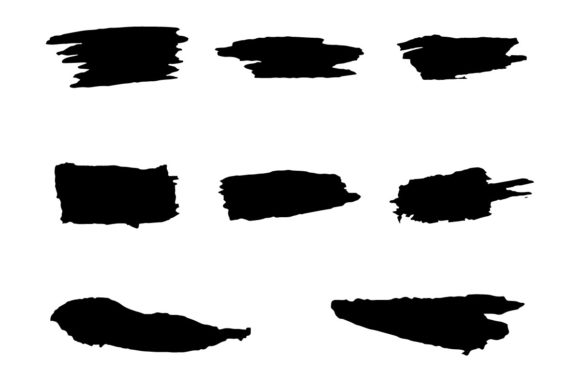
If you're tired of the same old clean, digital-looking vectors, you're not alone. There's a growing hunger for artwork that feels handcrafted, raw, and full of character. This is where Different Stylish Art Brushes come into play. These aren't your standard, smooth-edged Illustrator brushes. They are a curated collection of messy, inky, rough, textured, and even glitchy effects designed specifically for Adobe Illustrator. Think of them as digital tools that mimic the beautiful imperfections of real-world media—like a brush dragged through thick ink, a charcoal stick scraping across paper, or a screen glitching in a cool, aesthetic way. They are exclusive brushes that give your work instant personality and depth.
The core appeal of this collection lies in its versatility and the unique visual style it injects into projects. Each brush in the set has its own distinct personality. Some offer a gritty, street-art feel, perfect for bold headlines or edgy branding. Others provide a more subtle, textured grain that can add warmth and authenticity to illustrations or backgrounds. The "glitchy" styles are fantastic for modern, tech-inspired designs or music-related artwork, introducing controlled chaos and movement. Because they are vector-based, you get the organic look of traditional media with all the scalability and editability of digital art. You can resize them infinitely without losing quality, change their color with a single click, and combine them to create complex, layered effects that would be incredibly time-consuming to achieve by hand.
Where These Brushes Make a Real Difference
The practical applications for Different Stylish Art Brushes are vast. For designers and brand strategists, they are a secret weapon for creating a memorable brand identity. Imagine a logo that uses a textured, inky brush stroke as part of its wordmark—it immediately feels more human, approachable, and artisanal than a standard geometric logo. This is perfect for brands in the food, beverage, lifestyle, or craft industries that want to communicate authenticity and care. In packaging design, these brushes can create stunning, shelf-stopping graphics that look hand-painted, making products stand out in a crowded market.
For digital creators, the value is equally high. In web design and social media graphics, using these brushes for backgrounds, borders, or accent elements breaks the monotony of flat, digital perfection. They add a layer of visual interest that keeps users engaged. Content creators, bloggers, and publishers can use them to design unique featured images, pull quotes, or chapter headings in digital magazines and e-books, enhancing the reader's experience. Even entrepreneurs and small business owners can leverage them to create professional-looking marketing materials—from flyers and posters to email headers—that feel custom-designed, helping to build a consistent and polished brand perception without needing a full design team.
Working Smart: Customization and Compatibility
A key strength of this brush set is its focus on practicality. The feature of being easy customizable and editable is not just a bullet point; it's a workflow game-changer. Need to match a client's brand color? Just select the path and change the stroke color. Want to adjust the thickness or opacity? The stroke weight and transparency settings are fully at your control. This level of flexibility means the brushes can adapt to any project's specific needs, ensuring your design assets are always relevant.
The included file formats—Adobe Illustrator CC files (.ai), SVG, and EPS—cover the bases for both professional and cross-platform use. The native Illustrator files ensure seamless integration into your workflow if you're an AI user. The SVG format is crucial for web designers and developers who want to use these textured effects on websites while maintaining crispness and performance. EPS files offer compatibility with other vector software, making this a versatile addition to any designer's toolkit. This thoughtful packaging demonstrates a real understanding of how modern creatives work across different mediums.
Choosing and Pairing with Intention
So, how do you decide if these brushes are right for your project? Start by evaluating the mood you want to convey. If your goal is sleek, minimalist, and corporate, a glitchy brush might be too distracting. But if you're aiming for energetic, creative, youthful, or artisanal, they could be the perfect fit. Always consider your audience. A textured, rough brush might resonate deeply with a younger, creative audience but could feel out of place in a traditional financial report.
When it comes to font pairing, think about balance. These art brushes are inherently expressive and textured. Pair them with clean, simple typefaces to avoid visual clutter. A sans serif font with a neutral personality often works beautifully, allowing the brushwork to be the star. Conversely, if you're using a brush for a logo, you might pair it with a script font or handwritten font to amplify the handcrafted feel, but ensure the combination remains legible. The key is to use these brushes as accent pieces—think headlines, logos, dividers, or illustrative elements—rather than for body text, where readability is paramount.
Before committing to a final design, test the brushes in context. Apply them to a mockup of your website, print layout, or social media post. How do they look at the intended size? Do they maintain their character when scaled down? Does the texture get lost or become too noisy? This testing phase is part of a smart design process, helping you make informed decisions about which brush style to use and how much of it to apply. Remember, in design, restraint is often what separates good work from great work.
Building a Cohesive Visual Language
Ultimately, the power of Different Stylish Art Brushes lies in their ability to help you build a cohesive and distinctive visual language. When used consistently across your brand's touchpoints—from your logo design to your social media posts, from packaging design to your website—they create a recognizable aesthetic. This consistency builds brand recognition and professionalism. It tells your audience that you pay attention to detail and value quality craftsmanship, which can significantly influence their perception of your brand's reliability and creativity.
Think of these brushes as part of your broader modern typography and design toolkit. They aren't meant to replace a good serif font or sans serif font for reading long passages. Instead, they complement them, adding a layer of visual storytelling. A premium font collection might give you the words, but these brushes give those words texture, emotion, and a tangible presence. They bridge the gap between digital precision and human touch, making them an invaluable asset for anyone serious about creating compelling, engaging, and authentic visual content.